The Wisdom of Multiple Choice

posted by luis

You know how, when you’re in high school, one of the first little quiz "hacks" you learn is "CBDA"?

For those of you who a) didn’t go to high-school or b) are too old to remember this, CBDA is the frequency of the correct answers on any given multiple-choice quiz. In other words, when you have absolutely no idea what the correct answer is, and none of the options are particularly illuminating, "C" is the choice with the highest probability of being correct, followed by "B," followed by "D," and so on. This hack is pretty old, and most modern multiple-choice exams will be seeded in such a way as to defeat this. (If I’m not mistaken the classic CBDA theory stated that "C" would be the correct answer 40% of the time, "B" 30%, "D" 20% and "A" 10%. Yes, that means that answering all C’s will very likely result in failure.)

Anyway, I was reminded of this while trying some casual-hacking today on my friend’s online mid-term exam. We had determined how to retrieve the answers from the handler routine (more because of the naive lack of security, than due to our skills as hax0rs), and I was surprised to discover that the multiple-choice answers followed the CBDA theory almost exactly.

So I started thinking about other ways you could possibly cheat a multiple choice exam, and found this discussion via Google:

Other cool ways of cheating that have become legend or are passed down as "foolproof" methods.

- Thegood old cup of Coffee. Write the info on the cup, cover with a papersleeve, at the opportune time just slip the cover down.

- One guysupposedly wrote out his crib sheet in code, had it printed on thebacks of two shirts and paid the guys in front of him to wear them ontest day. He made up some random slogan on the front to explain thegibberish on the back, and to make it look like an orginization or clubshirt.

- Then there’s the girl who wore a remote vibrator to amultiple choice exam and was given the correct answers by a crude morsecode system.

Man, if you’re gonna go to all that trouble, maybe you should just study for the exam instead, know what I’m sayin’?


Weird Netspeak #1

posted by luis

Today’s weird netspeak, which seems to have suddenly just sprung up on news-links sites like digg (or, more likely, this is simply the first time I’ve noticed it):

RTFA, or "Read The Fucking Article." This is most commonly used to flame users that comment on a link without actually, well, reading the fucking article first. The implication is that this kind of behaviour occurs so often that people have taken to abbreviating their retort (in an effort, I suppose, to further confuse the already-clueless person they are speaking out against).

So Lost

posted by luis

We’re well into the second half of Lost’s much-anticipated second season, and as is often the case with these continuity-centric series, things have been developing very slowly for our band of survivors.

The producers have been trying to make up for the mid-season lull in action by pushing deeper into the backstories of the individual characters, which has so far been hit-and-miss. Most of the past episodes have been unnecessary fluff (with the exception of one of my favorite episodes of season 2, “The Long Con,” in which Sawyer figured prominently), and last week’s “The Whole Truth,” in which Sun discovers that she is pregnant felt like more of the same. That was, at least, until I realized that her pregnancy could very well be the focal point of yet another encounter with the mysterious Others, who abducted a similarly-pregnant Claire last season. Two weeks ago we finally got to see a little of what happened to Claire during her time with the Others, and I think it’s safe to say that their kidnapping her wasn’t just some random act of violence. There’s still quite a bit more that needs to be explained over the remaining 8 episodes, but don’t expect the mystery to be solved within that time. The season finale is scheduled to air on May 7th, and Naveen Andrews, who plays Sayid on the series, kinda indirectly stated that there may be a third (or fourth) season.

The episode airing tomorrow continues Sayid, Anna Lucia and Charlie’s trek to find Henry Gale’s balloon, as well as this interesting tidbit:

When the hatch suddenly takes on a life of its own, Locke is forced to enlist the help of an unlikely ally to control the matter.

While you’re waiting for Episode 17 (“Locke”down), check out this super rad Dharma Initiative Countdown Clock, which counts down backwards from 108 minutes. What happens once you reach zero? Well, I guess you’ll just have to wait and find out.

Random Quotes

posted by luis


"Everyone is a genius at least once a year. The real geniuses simply have their bright ideas closer together."

- Georg Christoph Lichtenberg

Amazon S3, and the Third-World Developer

posted by luis

I was listening to an interesting Techcrunch podcast interview this evening, with some of the people behind Amazon’s new grid-storage service S3. S3 was launched last month to almost universally positive responses from the developer community, and I’ve been waiting for someone to be the first to take advantage of its abilities. In a nutshell, S3 is an affordable storage service that developers can build their own applications on top of; all they have to do is pay Amazon for the filespace and bandwidth used on a per-month basis.

Online storage is pretty fashionable right now (there are over a dozen entrants in the space), and S3’s price of US$0.15 per gigabyte of storage per month and US$0.20 per gigabyte transferred is easily the cheapest "solution" available. Granted, there is currently no service for users to try just yet, because S3 has no front-end; it’s purely a resource for developers and providers who want access to storage that’s near-infinitely scaleable and supposedly very reliable.

So naturally I’ve been trying to think about what all this means to me.  At highfiber.org, about 75% of our monthly bandwidth and about 80% of our storage space is devoted to the sharing of various user-contributed files, so I could easily apply some of our rough numbers to S3’s pricing:

Highfiber requires about 7gbs total filespace on a month-to-month basis, and consumes about 11gbs per day of bandwidth. Following my percentages, that means I’d require 5.5gbs of storage at S3 and about 225 gbs of bandwidth. 5.5gbs multiplied by US$0.15 plus 225gbs multiplied by US$0.20 equals a total monthly expenditure of US$45.85. This is really interesting, because I am currently getting a much better deal from my dedicated hosting provider. One of the people speaking on the Techcrunch podcast actually did mention that he thought Amazon’s transfer pricing was a bit high and it turns out he was right.

Highfiber represents one particular style of online-storage that, I believe, will not benefit much from S3, i.e., the file-sharing portal. These types of sites have a relatively small footprint in terms of filespace because they routinely delete old files to make room for new ones, but their bandwidth costs are usually abnormally high. A particular file may be downloaded many, many times over during its lifespan on the server, and as such, bandwidth costs tend to very spikey.

The other style of online-storage is the personal-backup solution, of which I wrote an article about a few weeks ago. These sites are characterized by a higher filespace footprint, because people essentially use them as online mirrors for their desktops. However, unlike the file-sharing approach, their bandwidth costs are lower because generally only one user has access to a given set of files. This is the type of site that S3 was essentially built for, because it leverages the low filespace cost and minimizes the (relatively) high bandwidth cost.

Hrmmm.

ajaxWrite and gOffice

posted by luis

So
I’ve been trying ajaxWrite and gOffice over the past few hours, and
both seem like pretty decent services. As you can probably tell from
their names, ajaxWrite is an online word-processor and gOffice is an
online office suite, in which their word-processing component figures
rather prominently. I wasn’t able to sign up for the third company
that I wanted to review, Writely.com, as they’ve suspended
registrations for the time being (transferring code to its new home
at Google, according to the notice), so this is unfortunately not
going to be a full review of all three proponents.

ajaxWrite
is pretty much what you’d expect from an online word-processor; it’s
got a tiny footprint (400kb to download), is dead-simple to use, and
does all the essentials that you’d otherwise expect from its
desktop-based competition (i.e., save, print and do some basic
formatting). It’s essentially WordPad, but online and with a tabbed
interface. That, to me, is the big issue though: CEO Michael
Robertson
isn’t shy about his goals with this product. He wants to
replace M$ Word. For
most people, that means spell-checks and auto-formatting,
version-histories and email-integration, etc., etc. Some of these
things, i.e., spell-check and email-integration, are definite
must-haves and I don’t doubt that they’re already on the way to
building all the relevant modules, while the others are value-adds
that will come into play in a more enterprise-focused kind of
application. Silver Office’s gOffice, on the other hand, is slightly
more modest with their ambitions: they don’t seek to replace Office
so much as complement it.

At
the moment though, there’s nothing hugely compelling about either
ajaxWrite or gOffice, other than the fact that it’s a basic
alternative for people who don’t already have Word. In other words,
if I already had Word and the rest of Office installed on my machine,
there’s really no reason for me to switch over. These web-based
applications aren’t necessarily faster to load, because you do need
to go to the website and download the javascript every time you want
to use it (it does cache the code though, so the point of entry
becomes a two-step dance that involves opening up Firefox and
locating the appropriate bookmark). And resource-wise, it does
piggy-back on the Firefox run-time, so you’re not necessarily saving
a huge amount of RAM by using a web-based word processor instead of a
desktop-based one (especially if your copy of Firefox leaks).

Off-hand
though, it’s clear to me that ajaxWrite is the more streamlined of
the two word-processors I tried, not only for the way its interface
is designed, but also because it isn’t tied to a particular format
the way gOffice is (it only exports to PDFs, which it relies on for
its printing functionality; computers without Acrobat Reader are,
hence, out of luck). On the other hand, gOffice has already debuted
an alpha version of its Excel clone, which seems to be working
relatively well but doesn’t yet have any of the chart-generation
functions that we all know and love.

If you’re thinking of trying out either of these apps, there are a number of things you should be aware of:


  1. Saving a document
    in ajaxWrite requires that you download the file you created to some place in your desktop. In gOffice,
    meanwhile, your documents are saved remotely on their servers. The only
    way I could find to save it to your computer was by viewing the
    finished document as a PDF, and then saving the text through Acrobat
    Reader. The ajaxWrite solution makes a bit more sense if you’re looking
    for conceptual-compatibility with the desktop paradigm, but it makes
    incremental saving a bit of a bitch (you have to download the file over
    and over again if you’re paranoid about losing changes). gOffice’s
    solution makes quick-saving easier, but when you actually want to save
    a local copy of the file, it feels a bit unpolished.

  2. Opening a document
    in
    ajaxWrite involves uploading it to their server for processing. This is
    fine if you’re just working with text, but don’t expect to be able to
    write the manuscript for your next novel in this manner, as it is
    likely to cause headaches. It’s in this situation, primarily, that
    gOffice’s approach of remote-saving starts to make sense, because files
    are opened pretty much instantaneously. ajaxWrite’s
    your-data-is-yours-alone approach is certainly nice and all, but you do
    lose a large part of the flexibility that makes online word-processing
    appealing for certain types of people, i.e., being able to access your
    work files no matter where you are in the world. I think the proper way
    to approach this problem would simply be to let your users choose how
    they want their files to be saved. The solution that makes the most
    sense to me is to automatically save their stuff remotely, and then ask
    them if they want to download a copy for their local machine as well.

  3. Printing a document
    from
    ajaxWrite has the rather annoying consequence of having the URL appear
    on the top right-hand side of each page, as well as a time and date at
    the bottom (it uses the Firefox’s Printing component, and it can be
    pretty annoying if you forget to tweak the settings to turn all those
    extraneous headers and footers off). gOffice’s output, meanwhile, is
    quite acceptable without any tweaking, since it uses Acrobat Reader’s
    Printing component to get the job done.

Overall,
both of these applications look quite promising. Whether or not moving
to an online word-processor turns out to be the killer solution for you
will depend greatly on your own situation and workflow, I think.
Because I haven’t tried the most mature of these offerings, Writely,
I’m having a hard time coming up a very accurate assessment of just how
effective these online apps can be. I do know that a few of my issues
with either ajaxWrite and gOffice have already been solved by the folks
at Writely, so I guess I’ll continue this review once I’ve had a chance
to sign up for their service.

XHTML, and Why We Need to Start Using It

posted by luis

The following text is an article I contributed to Philweavers.net yesterday. Unfortunately, the formatting got a bit screwed up, so I’m republishing it here in case anyone wants to read it in a slightly more legible form.

I came across an interesting nugget of information while trawling the W3C website for specs on their XHTML transitional variant a few days ago, that I found to be so wonderfully obtuse that I decided I had to write a little something about it. Sayeth the W3C, by way of defining XHTML:

"The Extensible HyperText Markup Language (XHTML) is a family of current and future document types and modules that reproduce, subset, and extend HTML, reformulated in XML. XHTML Family document types are all XML-based, and ultimately are designed to work in conjunction with XML-based user agents. XHTML is the successor of HTML, and a series of specifications has been developed for XHTML."

Riiight. Well, I guess we can all go home now, because the technobabble definition above clearly answers all our questions … unless of course, you were looking for a slightly more "practical" description.

This is what I hope to shed some light on over the course of this post. At the end of it, I also hope to be able to convince a few of you to study the XHTML spec on your own, as I really do believe that it will soon become the de facto standard by which we build our web pages.

Before we delve into XHTML, we need to first clarify our personal, working definitions of HTML. Nearly every designer I’ve talked to has more or less defined HTML thus: "It’s the language that tells the browser what the designer wants the page to look like." If you agree with this definition, cheer up. You’re one amongst thousands.

The problem, of course, is that this definition is absolutely, 100% wrong.

It’s this fundamental misunderstanding of what HTML is for that is largely responsible for all of the wrongly-coded websites currently online. So what is HTML really? The most simple definition I could come up with is this: "It’s the language that tells the browser what the content it’s displaying _is_."

Now, because that is a very simple definition, I will need to explain further, and I’ll do so by talking about specific HTML tags, which I’m sure all of you are quite familiar with. Let’s take the text-related tags, H1, H2, H3 and P as our first examples. If you think about what these tags mean, you’ll realize that they have little to do with what the content actually looks like. These tags are really more concerned with what the content within them is. (Contrary to popular belief, the "H" tags don’t define the size of the text so much as their level of importance, H1 being the most important or "main" title, H2 being the next most important, and so on. It just so happens that our visual idea of importance is directly related to size, so H1 is bigger than H2, which is bigger than H3, and so on.) P, meanwhile, defines a given body of text as being grouped together as a paragraph. Notice that neither the H tags or the P tag directly say anything about what they are supposed to look like. (By "look like," I mean, what font, color, or exact size they are supposed to be.)

In fact, if you look at the HTML vocabulary, you’ll see that the prevailing trend is to define the meaning of the content, and not its appearance. (There are a handful of exceptions to this though, which include the FONT, B, I and U tags among others. More on this later.) How then do we, as designers, actually define how we want our content to look? Well, that’s where CSS comes in.

Now, CSS as a discussion topic is enough to fill several books, so I won’t go into the gory details here. We all know that we use CSS to access various design features that aren’t available in HTML, but the way I see it being implemented is more of an extension than anything else. The thing is, CSS is the most correct way to apply layout and aesthetics to your pages. Essentially, we use HTML to define the various parts of the content, and we use CSS to design what those parts looks like. For example, you could have a long chunk of text, all separated properly with P tags. That would be HTML’s job. You would then apply styles to those paragraphs with CSS, by defining say, the font-family, the margin, the line-height or any other number of attributes.

This is why it is conceptually wrong to use the FONT, B, I or U tags, because they stipulate what the content within them should look like, when this is clearly not what HTML was intended to do. Most standards-aware designers use STRONG instead of B, and EM (emphasis) instead of I, because these alternative tags adhere more to the guiding principles of semantic markup. The thinking is that although there could be many ways to design what STRONG or EM(phasis) looks like, there is only one way to design B or I. Meanwhile, tags like TABLE or body attributes like BGCOLOR and BACKGROUND are usually incorrectly used as a means of creating graphically-rich layouts, when the correct methods should be to use DIVs and then define things like color and background-image through CSS instead. (TABLE is meant for making tables, and nothing else. We were never meant to use them as our primary layout tools, and yet so many people still do.)

Ok, assuming you’ve read this far without violently disagreeing with me, the question on your mind will probably be, why do I need to go through all the trouble of doing this, when the old methods work fine? That’s a very valid question, and I’ll admit that there are times I skimp on the proper HTML usage as well in an effort to save time. The answer to that question, coincidentally, brings me back to the original topic of this post, i.e., XHTML.

XHTML is the successor of HTML, and aims to properly enforce the principles mentioned above. The problem with currrent HTML is that it is very very quirky, with various browsers having different interpretations, and the language itself having weird inconsistencies (the aforementioned FONT, B, I or U tags are the most obvious). XHTML is the refined version of HTML, and its strictest variation fixes many of the mistakes in HTML 4.0. The reasoning is that the more strict you are, the more likely it is that browser manufacturers will follow the guidelines you set down.

There are some very compelling reasons to use XHTML, which I’ll go through very quickly now:

  1. This one’s the most obvious: when you properly separate content from design, you make your pages very flexible. You could easily change the layout of your entire website, by replacing one or two CSS files. And if you change your mind about small things, such as the color you chose for your links, you only need to change one line in one file, and the entire site is instantly revised.
  2. Repurposing your web pages for other mediums, like cell-phone screens, PDAs, or even print, becomes a lot easier because none of the tags you use are specific to the desktop-based web browser. Again, it’s simply a matter of switching out CSS files.
  3. Designing in XHTML allows your page to be more accessible to people with disabilities like low- or no-vision, because screen-readers can interpret the pages more easily.
  4. Your code is cleaner, easier to read and generally loads faster because it avoids redundancy in tag attributes.
  5. It’s a known fact that if your code identifies its doctype as XHTML Transitional or XHTML Strict, modern browsers render it faster because they don’t have to go through your code line-by-line and look for errors that need fixing.

The important thing to remember, I think, is that writing XHTML code is no more difficult than writing HTML. You will definitely need to wean yourself off of WYSIWYG editors in order to do this properly though, but you should have done that a long time ago anyway if you wanted to specialize in web design. The problem with WYSIWYG editors, you see, is that they (ironically) put a significant amount of emphasis on designing the look of your HTML documents, and you often end up with lots and lots of inappropriately-used code like FONT and BR and non-breaking-spaces as a result. Rather than cleaning these up later, it’d be better to simply dump your WYSIWYG editor completely and just code by hand. The beauty of proper XHTML usage is that the code you actually write is significantly decreased, with most of your "design" time spent tweaking and adjusting a single style-sheet that will affect your entire site.

As you can imagine, there are some rules as to how to write proper XHTML, and although it’s very similar to regular HTML, you will have to keep these things in mind. Here are a few of them, to give you an idea:

  1. All tagnames must be in lowercase, e.g., <strong> and not <STRONG>
  2. All tags must be properly nested and closed, e.g., <a href="#blah"><strong>sample textstrong></a> or <img src="filename.gif" width="100" height="100" />
  3. All attribute values must be contained with quotes, e.g., <body topmargin="5" leftmargin="5">

There may be some of you who are turned off by the finicky nature of XHTML and the tedium of coding by hand, but these are very necessary skills that will eventually become second-nature to you given enough practice. Look at this way: you will not find many professional architects or engineers who shun math in their day-to-day work, so it’s only natural that you, as a professional webdesigner understand the code you are using inside and out. Obscuring it with a WYSIWYG editor will only keep you from improving your skill to its fullest potential.

Over the next few weeks I’m going to try to write some practical XHTML/CSS usage examples, so you can get a better idea of just how easy it actually is. Unfortunately, many of my older sites are still all written in the clunky, table-style, but I have been forcing myself to build every new website in the proper XHTML style. So, ’til next time, keep your tags lowercase and your attributes properly quoted!

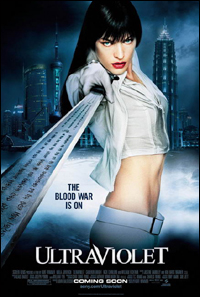
Ultraviolet

posted by luis

Ultraviolet

It must be tough, being Kurt Wimmer. You make one decent sci-fi with a memorable gimmick, and suddenly everybody thinks you shit gold. Suddenly, expectations for your big followup are through the roof, and you think, "Damn, how am I ever gonna top Christian Bale still-dancing with akimbo pistols?"

Unfortunately, the answer turned out to be Ultraviolet, a movie that is matched only by Matrix:Reloaded in its over-the-top, too-much-of-everything approach to followups. Like Reloaded, Ultraviolet just doesn’t know how to quit, going well beyond the limits of common sense and crossing over into the realm of big-budget insanity. If you’ve seen the trailer, you’ll already know that it’s a heavily color-balanced, soft-focused, adrenaline-paced affair, but what you probably didn’t know is that the entire 88-minute run looks and feels that way.

The plotline is your basic dystopic sci-fi, with Milla Jovovich’s character being one of the key players in a resistance movement against the megalomaniacal, nose-plug-wearing Daxus, played by Nick Chinlund. Being exceedingly cool, Violet is a vampire-esque, color-shifting fashionista with a serious chip on her shoulder and the craziest martial-arts moves since mid-90’s Jacky Chan. This is the sort of character that faces down hordes of enemies with a funky pair of shades and a snappy one-liner, and indeed, she plows through most of this movie with little else.

As you can expect, our heroine finds herself in a situation that illuminates her enigmatic personality, i.e., she is forced to protect a child that becomes an emotional surrogate for the baby she herself lost many years ago. Whatever. Most of the character development in this movie is lost in a sea of extreme close-ups, mexican standoffs and thumping trance mixes.

The sad thing is that there are a few really interesting sci-fi ideas in here, that will undoubtedly find their way into better movies in the future. Among them are an anti-gravity belt that allows our heroine (and her motorcycle) to traverse ceilings and walls in several break-neck chase scenes, dimension-warping technology that allows the concealment of an infinite assortment of weaponry (yeah ok, this one’s probably from Spider-man’s alien costume), and a disposable public telephone with a handset made of paper (I wonder what happens when it’s raining?). Interesting? Sure. Over-used? Definitely.

If you’re watching this movie as an Equilibrium fan, you’ll probably be wondering about the fight choreography, and you’ll be glad to know that there are several sequences in this movie that are, at the very least, entertaining to watch. The problem is that there are so many of them that tend to merge into one another and it becomes hard to tell one fight from the rest. My biggest beef is that the last fight, which should often be the best of the bunch, is a disappointingly clunky bit of fiery swords clashing in a dark room. Whether Wimmer did this on purpose, or if choreographer Mike Smith simply ran out of ideas, I don’t know.

If you choose to watch this movie, my advice is that you consume a generous amount of alcohol before sitting down, or better yet, brown-bag it into the theater. This just isn’t the sort of movie you want to be watching sober, trust me.

Pinoy-made MySpace

posted by luis

A couple of years ago, I started laying down plans to build a pinoy-focused blog publishing network, in the same vein as LiveJournal. It was to be called "BlogJam." I spent about 18 months building it on and off, until I came upon the realization that it wasn’t the kind of project that you could just build from the proverbial grassroots, especially when you were financing it with the average income of a third-world developer. At that point, I had built about 75% of all the functionality, although I lacked the actual design templates that would give each user’s blog its form.

After much thought, I decided to shelf the project until one of two things happened: either I found enough money to get it going properly, or I thought of something totally innovative that would by itself be enough to "sell" the site to its potential audience. Since neither of those things happened, I instead went on a half-bitter creative binge that resulted in oKs.ph and gibbity.com, respectively (not that I think either of those projects were "poor consolations," mind you; they were certainly quite a bit smaller in terms of amibition and scope though).

During that same period, the people behind dotPH introduced their new i.ph service, which is essentially a more professional version of the site I had been trying to build as an individual. For the most part, their featureset looks pretty decent, and considering their monopoly as the Philippines only domain-name registry, they certainly have the financial foundations to properly grow a business like this.

But of course, neither of those two anecdotes are the point of this post, because I’m really writing because of this ambitious, pinoy-made Blogspot-like project, FunChain. On his blog, creator Jason Banico explains why he is (re)building FunChain as a sort of fusion between BlogSpot and MySpace. This bit, in particular, stood out:

MySpace has a crappy blogging tool, and Blogger doesn’t even have asocial networking back-end. LiveJournal has some social networkingattached to it somewhat, but the point is moot since it has been leftin the dust. […] Now, there have been attempts to create this blogging + socialnetworking hybrid, like Yahoo! 360. However, despite Yahoo!’s might, itfailed to make this fly. Why? Well, because the blogs in 360 don’t lookany better than those of Friendster or MySpace.

Off-hand, this seems like he may be underestimating the competition somewhat, but that might just be me. Yahoo!360 is a relatively young service, and the big Y! has more than enough money to keep it going for as long as it takes to take hold. (360 isn’t an experiment so much as an imperative for Yahoo, and given that their network has 191 million registered users, it’s not particularly at a loss for an audience to "force" the service on.)

Technology-wise, FunChain is still pretty rough so it’s difficult to get a bead on exactly where he’s at, although I’ll assume from the "Beta Release" on his headers that he’s still quite a ways off. (The lack of a WYSIWYG editor for his blog-editor was particularly telling.) Appearance-wise, I must say I’m a bit irked by the fact that it looks too much like Blogger.

The one thing I do like is how the navigation is arranged at the top of the screen (Home, Profile, Blogs, Network, Messages, Search), which makes a lot of sense and really helps keep the various sections organized in your head.

Check out FunChain beta here. (And check out the blog I created here.)

Test Your Gaming Knowledge

posted by luis

I’ve spent way too much time on this little AJAX mini-game over the past two days, so I may as well write about it here. Recently I got the idea to make a game out of Gibbity’s Game Quote of the Day feature, that’d basically allow people to guess which game the quote came from. Eventually, I’ll connect the scores to the members’ profile page, so you can see how well you stack up against other members.  For now, it’s just a funny little time-waster, a game about games.

« Previous Entries